Drupal CMS was officially released on January 15, 2025, but a pre-release version had been available in December, and I'd installed it in my local Mac environment and given it a quick look.
I've been installing a few themes and exploring, hoping to get a sense of whether it would work for my own site. The concept: moving away from Drupal's image as a developer-only CMS by making the interface more accessible to general users; and minimizing terminal-based operations by making module and theme management completable entirely through the GUI.
There are quite a few features that feel like they were developed with WordPress's popularity in mind — specifically the approach of making site building accessible to users without deep IT knowledge.
Unlike a standard Drupal Core installation, Drupal CMS ships with modules pre-packaged based on the intended use case — blog, news site, and so on. Since I use Drupal for a personal blog, I selected the blog package during installation.
This site runs on Drupal 10.x via Lightsail and Bitnami, and functional limitations mean I'm already looking at migrating to AWS EC2 and updating to Drupal 11.x — so migrating to Drupal CMS immediately isn't on the agenda. But its potential to become Drupal's main distribution down the line is compelling enough that I've installed it locally on my Mac and been exploring.
After installing the pre-release I had a quick look, but then got tied up updating a separate WordPress site that had gone stale — and Drupal CMS sat untouched for a while. It was still on the pre-release version, so some time had passed since the official release, but I decided to revisit it and updated from the pre-release.
1.impression
The admin console's layout and features show changes throughout that feel deliberately informed by WordPress. I've only scratched the surface so far, but here are the features that stood out as genuine steps forward from traditional Drupal Core.
1-1.menu
Logging into the admin console, the first impression is how polished the admin menu looks. In Drupal Core the admin menu sits across the top in a horizontal bar, but here it's placed in a left sidebar — the same layout as WordPress.
Traditional Drupal packed its menus with every conceivable function, with an interface that kept things relatively flat and gave access to a wide range of features without much hierarchy.
Drupal CMS's menu selects only the functions most users will commonly need and groups them at the top of the hierarchy, while specialized or rarely needed functions are tucked into lower levels. The result is a menu structure where someone with no Drupal expertise can find what they need to build a site from their very first session.
The key difference I've felt between Drupal and WordPress: Drupal requires you to configure Core's fundamental settings before you can start building a site, and what themes and modules can configure sits within that same Core-first framework — which makes it hard to create a custom design or site structure just by lightly poking at the defaults.
WordPress builds Core-level functionality into its themes and plugins, so you can use the intuitive interfaces those provide without thinking about Core configuration at all — and just by exploring the defaults, creating a custom design and site structure is relatively achievable.
WordPress's strength is an interface that's visually intuitive — it lets you build out a site design and structure without needing to understand how WordPress itself is structured.
Drupal CMS has been developed with an interface that's approachable not just for the developers and developer-adjacent users who've traditionally used Drupal Core, but for someone building their first website.
At this point the Drupal CMS interface is more approachable than before, but the templates and default functionality provided by modules and themes are still built around traditional Drupal thinking — so becoming truly WordPress-like is still some way off, though I expect it will continue to evolve in that direction.
1-2.Extend
A major change in Extend's module management: in Drupal CMS, Drupal Core can be updated from the admin console without using Composer. The process — Download → select Maintenance Mode → Install → Update Database — is all completable from the admin console, with the GUI guiding you through each step in order.
Individual modules and themes were already updatable from the admin console, but now Core program updates can be done the same way.
1-3.Browser Project
A new Browser Project menu has been added, allowing themes and modules to be browsed and installed directly from the admin console — much like adding plugins or themes in WordPress from the admin panel.
Previously, the official Drupal site listed links to modules and themes, and you had to follow each module's installation instructions — which generally meant using Composer. Being able to complete the whole process through the GUI from the admin console, without any terminal commands, is a significant step.
1-4.Content
The basic operations are largely the same as traditional Drupal, but creating content or basic pages now includes MetaDescription as a standard field, and scheduled publishing has been added. Previously MetaDescription required the Metatag module and scheduled publishing wasn't available at all without a separate module — having both packaged in from the start is a significant evolution.
In WordPress, scheduled publishing is done by specifying a publish date, and MetaDescription is either provided by the theme or requires a plugin like Yoast.
1-5.Packaged modules
Because the modules needed for blog use are pre-packaged and installed from the start, modules I used to install manually come ready to go with dependencies already resolved. EasyBreadCrumb for breadcrumbs, Scheduler, Webform, and Captcha all pre-installed with clean dependencies — another significant step forward.
It's still early days, there are plenty of features I haven't touched yet, and there's more that's been added beyond what's covered here — I'll work through the rest gradually.
Impressions of Drupal CMS
- Polished menu structure
- Feature menu layout is easier to understand
- Installation and updates fully completable through the GUI
- Usable without terminal or command-line knowledge
- Distribution packaged to match your intended use
- Package that enables meaningful content creation right out of the box
These improvements mean that working through the polished GUI interface can now get you to a working website without understanding Drupal Core's internals. That said, this is still being realized at the level of the core program's development philosophy — so in practice, understanding Drupal Core's features remains necessary to build what you actually want.
For it to reach the WordPress-style point where you learn how to use things simply by exploring the visually presented GUI, modules and themes will need to embrace Drupal CMS's development philosophy and provide multiple practical, ready-to-use templates — and that's still ahead.
WordPress is currently on 6.7, and from 6.6 onward there's been a move to integrate into Core the interface improvements that third parties had been building. One example: navigation menu customization, which previously depended on widgets provided by theme or plugin developers, is now part of the standard WordPress builder.
In database operations like page generation, Drupal has a processing speed advantage over WordPress thanks to Core's built-in process caching — but WordPress has been closing the gap through infrastructure-level speed improvements like Kusanagi servers, and scale and use case alone are no longer the only criteria for choosing a CMS.
Drupal CMS is a package that brings WordPress's strengths into Drupal. WordPress's major advantage — a thriving third-party marketplace — is what drives the polish of its plugin and theme interfaces; Drupal is still building toward that. As the third-party marketplace matures and interfaces and practical templates become as refined as WordPress's, that's what will enable Drupal CMS to achieve its goal of broadening its user base.
As an aside — I've been getting the sense that WordPress's evolution, Drupal's evolution, and the features that split off to third parties are all converging again. What started as programs for building websites with PHP and a database branched into several CMSs that evolved independently, but as some ideal answers have emerged, the distinct advantages each developed on its own are crossing over between platforms.
2.Problem
I've only explored lightly, but there are a few issues worth noting.
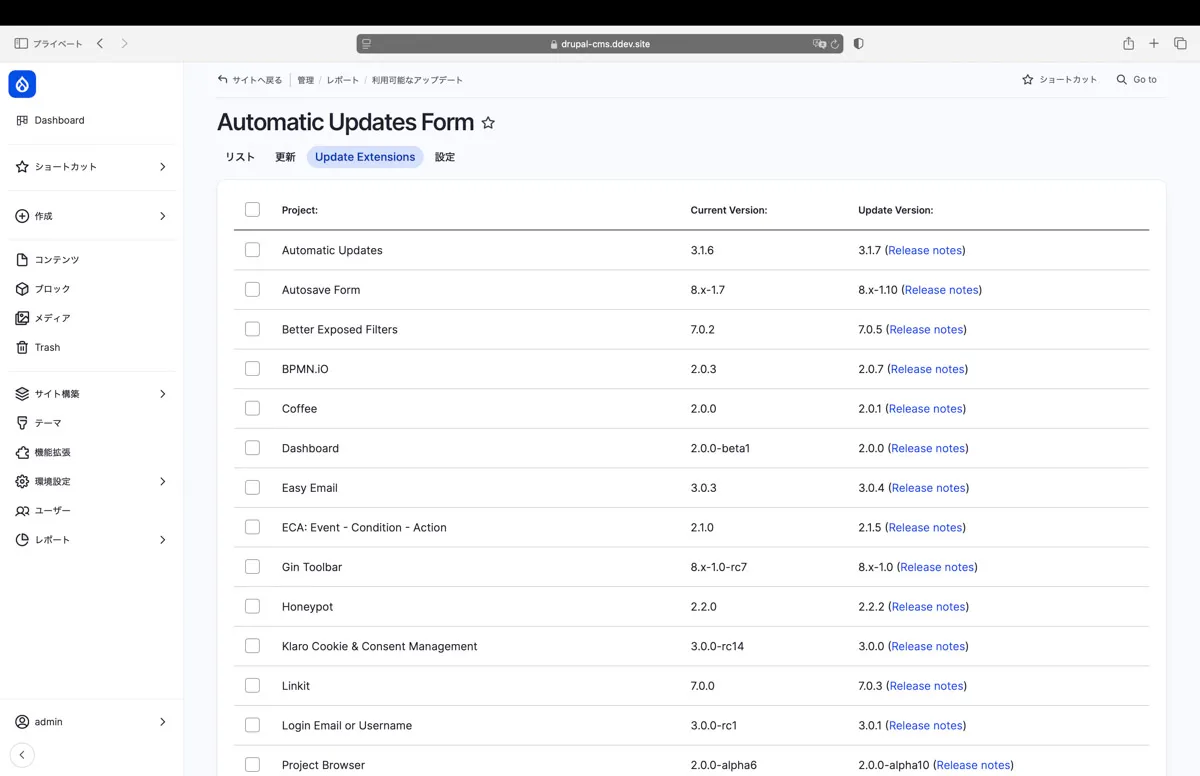
The pre-release had been sitting untouched for about two months, so I updated to the official release and updated the modules too — and since updates can be done through the GUI, I tried doing everything from the admin console. The Automatic Updates module threw an error that took quite a while to resolve. The details would make this article too long, so I'm hoping to cover them in a separate article.
Uninstalling and reinstalling the module via Composer resolved the error, so some modules may have bugs that surface when installing through the GUI. (DDEV's environment may also be a factor.)
With the interface redesigned, it's harder to find where familiar Drupal functions have ended up. The traditional interface made every setting accessible, but to avoid confusing first-time users some settings have been removed from view — moved to lower menu levels or masked — so experienced Drupal users may find themselves disoriented at first.
As a newly launched project, some modules are still in beta, and while this hasn't caused practical issues it may affect stability depending on the environment.
Conclude.
This article covers first impressions of Drupal CMS — released not as a Drupal Core update but essentially as a distinct CMS in its own right. Coming from someone without deep IT knowledge, it may not be the most authoritative take — but the sense I get is of a distribution that's opened the door beyond Drupal's traditionally developer-oriented image, developed with clear awareness of WordPress's success in reaching general users.
With Drupal CMS's release, the official Drupal site now positions Drupal CMS as the distribution for general users and Drupal Core as the distribution for developers.
Drupal is an excellent program — its default state offers solid scalability, and its strength in organizing information has made it a natural fit for organizations that run websites as part of their core business.
But the process of building a site starting from Drupal's foundational configuration has a high barrier to entry for general users — often making it unavoidable to bring in a developer or vendor.
That's also meant most third-party offerings are developer-oriented, making it hard for general users to easily build a site with the design and features they want. If Drupal CMS's concept leads to the development and spread of themes and modules that general users can actually use — and if sufficient demand forms to make a viable market with real revenue potential — then quality paid themes and modules will increase, accessibility will broaden the user base, the market will develop, a sustainable revenue structure will take shape, and the financial stability around the Drupal project could enter a virtuous cycle. That's what I'm hoping for.