Part 1 audited the environment, and Part 2 covered updates and settings changes. This article explains the theme dependency discovered during that work and the switch to an independent theme.
The Stable 9 warning in Drupal’s status report prompted me to reconsider the site’s theme.
I ultimately replaced the existing subtheme with a new independent theme. Alongside resolving the warning, it became an opportunity to think about presentation that suited my articles.
Stable 9 was still in use
A Drupal theme can use another theme as its base. A subtheme inherits presentation and styles from that base theme and adjusts them. Selecting a theme with a name of your own does not necessarily make its foundations independent.
Initially, I wondered whether Stable 9 was unused on the current site. Inspecting the files revealed the following dependency:
Custom subtheme → Bootstrap5 4.0.8 → Stable 9
Tracing base theme in the theme definition files showed that my custom subtheme used Bootstrap5, which in turn used Stable 9. Here, Bootstrap5 means the Drupal theme installed in this environment. Its structure needs to be distinguished from the Bootstrap CSS framework itself.
The name of the selected theme does not reveal all its base-theme dependencies. I could not simply remove Stable 9; I needed to consider the structure of the active theme as well.
Bootstrap5 also has a 5.0.x beta line that lists Drupal 11 and 12 compatibility. This is therefore not a claim that Bootstrap5 becomes unusable in Drupal 12 or that an independent theme is the only option. Moving to a compatible release is another approach. Official Bootstrap5 project ↗
With that option available, I chose to build an independent theme. This was a decision about the presentation I needed and the structure I wanted to maintain, rather than a judgment about the quality of an existing theme.
Consider what the site needs
My site is a personal publishing space centered on articles and photographs. I do not necessarily need a theme with many features or an administration interface that can change every detail.
What matters to me is spacing and typography that suit the writing and photographs, navigation that keeps long articles readable, and connections to related articles.
It feels similar to choosing a book’s format, paper, typesetting, and binding. I want to shape how the work reaches the reader as well as the manuscript itself. That is why I build a theme.
Why continue using Drupal?
There are other ways to create a custom appearance. I use Drupal because it lets me retain the structure of the articles and information I have developed over time.
Taxonomy classifies articles and connects them through topics and interests. Views uses those classifications and other criteria to assemble the lists needed in different places.
For example, readers can find one article both in the Drupal article list and through a tag for a module it discusses. Japanese and English versions are linked so that either language leads to the corresponding content. I use Drupal to create multiple ways into an article, beyond storing it as a single page.
For this work, I separated what to retain from what to redesign, rather than changing the article selection rules and classification structure at the same time.
| Retained | Reviewed and redesigned |
|---|---|
| Existing articles, photographs, and Japanese–English relationships | Typography, colors, spacing, and logo |
| Taxonomy classifications and their article relationships | Placement and presentation of classifications and tags |
| Existing Views selection criteria | Templates for the home page and lists |
| Body headings, code, images, and existing IDs | Table of contents, language switching, related articles, and previous/next navigation |
I did not discard the existing articles and taxonomy to rebuild the site. I retained Drupal’s content structure while renewing the presentation readers see.
For me, Drupal is both a place to store manuscripts and an editorial system for organizing relationships between articles.
Build an independent theme with AI
I used Codex to develop the theme. I checked the existing block placements and theme dependencies, prepared an independent theme, and then switched to it.
I named it “Interest Editorial” and set base theme: false in its definition. This specifies that it does not inherit from a particular base theme. Drupal’s documentation describes this setting for themes without a base theme. Theme definition file documentation ↗
name: Interest Editorial
type: theme
base theme: false
core_version_requirement: ^11 || ^12
This excerpt contains the name, inheritance setting, and supported core versions from the actual definition. Those settings alone do not produce the finished presentation. I also created Twig templates for pages, articles, and lists, CSS for their appearance, and JavaScript for menus and the table of contents.
The theme has neither Bootstrap5 nor Stable 9 as a base and requires no external CSS framework or theme build tools. It still uses Drupal’s rendering system; this does not mean Drupal’s output or libraries are no longer involved.
I combined an off-white background, dark ink-colored text, a muted orange accent, and serif headings to give it the feel of a publication. After switching, I checked that articles, Views lists, Japanese and English pages, and forms rendered.
Switching required more than changing the theme definition. I carried over blocks such as article lists from the old theme and checked that the header, footer, and article entry points appeared in the new one.
I then uninstalled the old subtheme, Bootstrap5, and Stable 9 from Drupal’s installed theme configuration. I retained the old source for recovery; I did not manually delete core files.
What an independent theme makes me responsible for
Reducing dependence on third-party themes also increases the range of checks I need to perform myself.
These include following Drupal core changes, accessibility, keyboard operation, form error displays, and readability on phones. AI makes creating a visual design easier, but those checks remain necessary.
During this work, I checked horizontal overflow at mobile widths, opening and closing menus, existing article rendering, and error messages after submitting an empty form. I also placed the same theme source in the Drupal 12 beta environment to try its basic rendering.
These were basic functional checks. They did not complete testing of every display or every combination with contributed modules.
Make the home page and lists help readers choose an article
After switching themes, I refined the home page and article lists. The home page has two sections, Drupal & Web and Life & objects. Each uses a single column showing dates, article numbers, titles, short summaries, classifications, and tags. Both Japanese and English home pages show four articles per section.
The single-column list lets readers scan titles and summaries from top to bottom when choosing what to open next. I retained the original Views selection criteria while adjusting information order, spacing, and template presentation.
Classification and tag lists follow the same reading pattern. Long classification descriptions can be expanded when needed, and article dates, summaries, and classifications are grouped together. Article numbering continues across list pages so readers can see their position in the list.
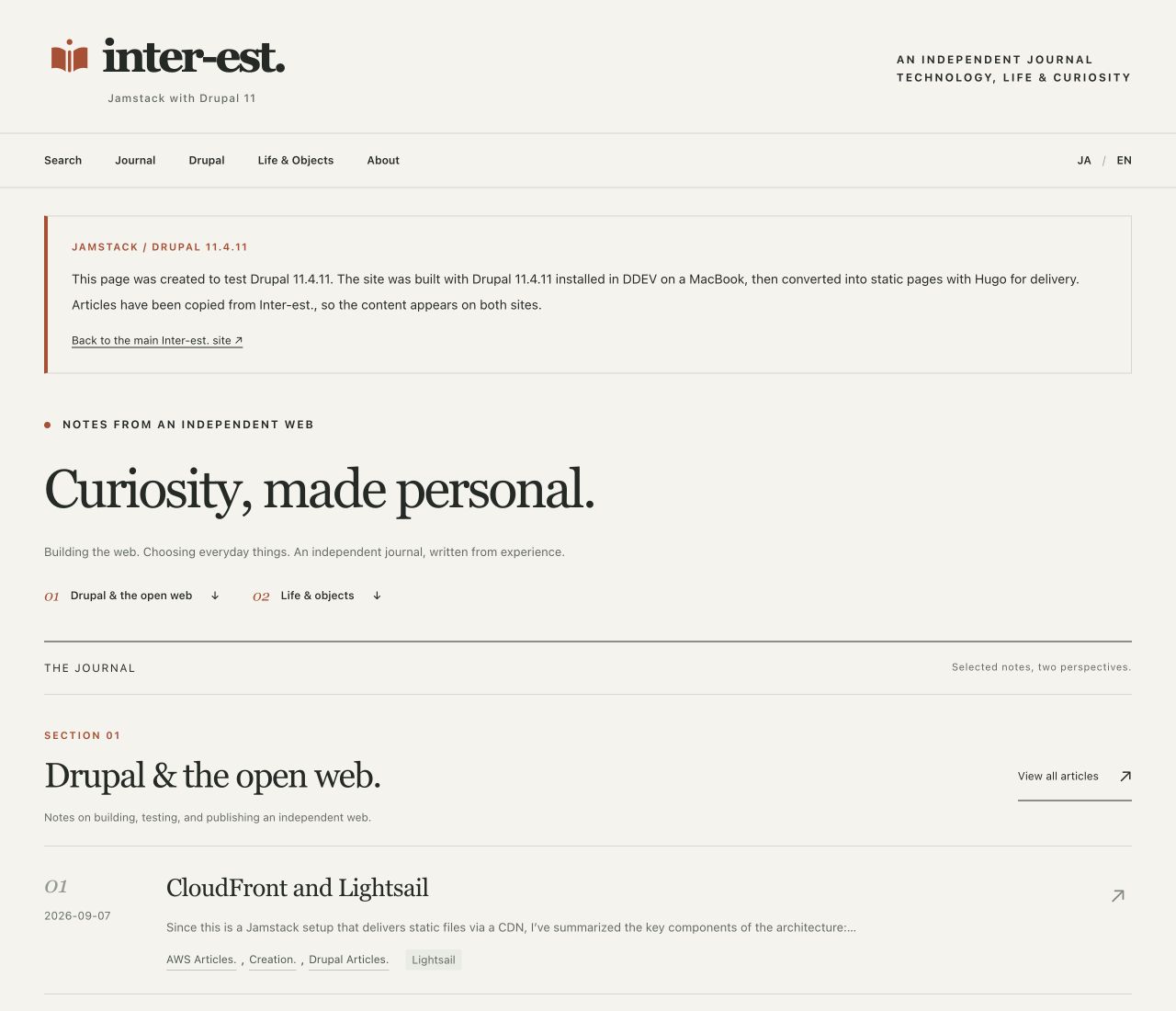
A preview of the Drupal 11 home page output through Hugo. It retains the warm background and single-column article selection layout. The screenshot shows the English page.
Give article pages a three-column reading layout
For long articles, I considered how readers would find their current position and move to other articles as well as read the text. On desktop, I placed the table of contents on the left, the body in the center, and related articles on the right.
The table of contents comes from body headings and retains their existing IDs. Readers can jump to a heading while older in-page links continue to work. Language switching leads to the article’s translation, and previous/next navigation follows article numbers.
I applied this reading layout to 58 numbered articles, or 116 bodies across Japanese and English. About serves a different purpose, so it omits dates and adjacent article numbers. Its side navigation instead provides a page table of contents and entry points to the two article groups.
At smartphone widths, the body becomes a single column with a collapsible table of contents. At 390px, I checked for horizontal overflow and tested menu opening and closing, table-of-contents links, and collapsing. The desktop three-column arrangement is not simply squeezed into the narrow screen.
Refine the editing screen as well as the presentation
Once the reading layout was in place, I needed to review older navigation embedded in individual article bodies. Existing language switches, in-page links, and numbered pagination duplicated navigation supplied by the new theme.
I first tried filtering the old navigation during rendering, then cleaned up 118 Japanese and English bodies across 59 published articles, including About. I retained the earlier content through new revisions and a database backup. I did not indiscriminately remove buttons and menus that appeared as examples within tutorials.
Afterward, I compared headings, code, image references, and existing IDs against the previous revisions and confirmed they were retained. This was separate from migrating the bodies again or rewriting article content. Unpublished drafts were excluded.
I adjusted the editing screen through a separate local custom module, interest_editor. It puts the title, summary, and body first, groups images, classifications, and article information, and provides a body field suited to long writing. New articles default to unpublished, while existing published articles retain their status.
Keeping theme presentation separate from editing-form changes made it possible to inspect the reader’s experience and the writer’s content-management workflow individually.
Keep Drupal 11 as the baseline for the next tests
After these changes, Drupal’s status report showed zero warnings and errors, and the dependency audit found zero known vulnerability matches. I also checked access to synchronization YAML and persistence of settings after restarting.
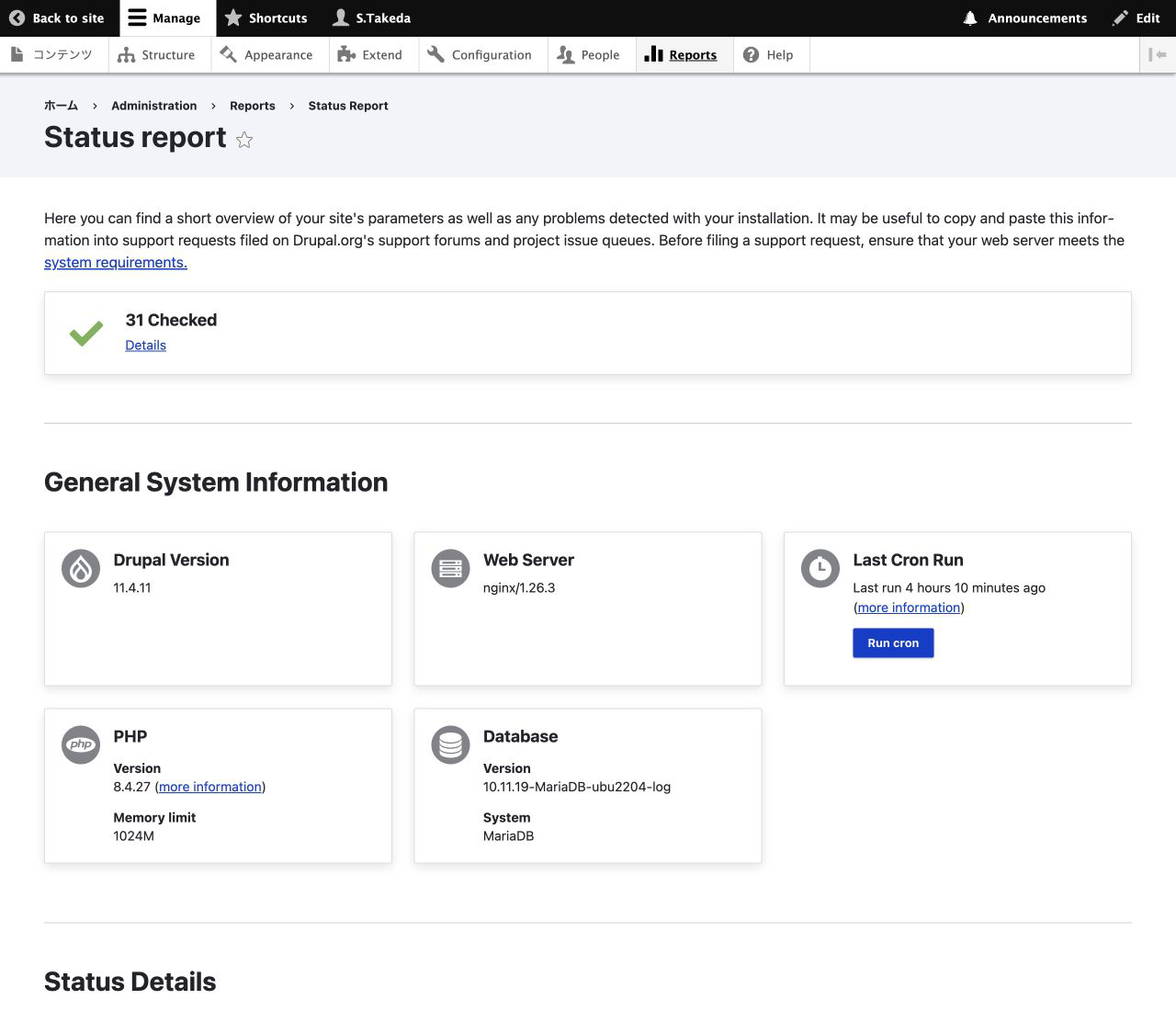
*The English-language Drupal 11 status report, captured on November 2, 2026. Drupal 11.4.11 and PHP 8.4.27 are visible as recorded when the screenshot was taken. Select the image to open it at full size. *
These results apply to the scope checked on November 1, 2026. They do not remove the need for future updates or guarantee the safety of the entire environment.
The presentation is available in the Jamstack with Drupal 11 static sample . It is the Drupal presentation built in DDEV on a MacBook and output as static files through Hugo; Drupal does not run on the public delivery server. The articles were copied from Inter-est., so they duplicate this site’s content. The sample does not provide login or publishing functions.
I am retaining this Drupal 11 environment as the comparison baseline while continuing tests in a separate Drupal 12 beta environment. The next article describes the dependencies encountered during a fresh installation and the work required to run the same independent theme.
Follow-up: official-source comparison (November 4, 2026)
These notes were added after reviewing official sources on November 4. They are separate from the November 1–2 measurements; no Drupal environment was changed or retested.
Retaining Stable 9 is also an option
The contributed Stable 9 project ↗ lists releases compatible with Drupal 11.3+ and 12. Deprecating the bundled theme does not require every site to adopt a wholly independent theme. Reviewing parent-theme releases and contributed replacements is another option.
The independent-theme change remains this site’s design and maintenance choice. No contributed Stable 9 or Bootstrap5 installation was retested in this follow-up. See the guide’s theme annotation .
Today’s article list differs from the historical static sample
On November 4, this site’s Hugo lists were reorganized around Security, Releases and Guide collection entrances. That change does not reverify the Drupal Views configuration or the historical 58-article static sample described here. Distinguish the current main-site list from the screenshots and samples created for this article.